Streamlining Carbon Footprint Management: A Guide to AWS Sustainability Console
Overview
The AWS Sustainability Console is a dedicated service that centralizes your organization's carbon emissions tracking and reporting. Designed to address the growing complexity of sustainability workflows, it builds upon the Customer Carbon Footprint Tool (CCFT) while introducing its own permission model, customizable CSV reports, programmatic access via API and SDKs, and support for fiscal year alignment. Whether you are a sustainability officer, a reporting analyst, or a DevOps engineer embedding environmental metrics into dashboards, this guide will walk you through everything from initial setup to advanced data integration.

Prerequisites
Before diving into the AWS Sustainability Console, ensure you have the following:
- AWS Account: An active AWS account with the necessary IAM permissions. You do not need billing-level access; the console uses its own independent permission model.
- IAM Permissions: Attach the
AWSustainabilityConsolasFullAccessor a custom policy that allowssustainability:*actions. See the Common Mistakes section for details on common misconfigurations. - AWS CLI or SDK: If you plan to use the programmatic API, install the AWS CLI (version 2.x) or configure your preferred SDK (Python, Java, etc.) with valid credentials.
- Understanding of Emissions Scopes: Scope 1 (direct), Scope 2 (indirect from purchased energy), and Scope 3 (other indirect) emissions are included. Familiarize yourself with the Greenhouse Gas Protocol to interpret reports.
Step-by-Step Instructions
1. Accessing the AWS Sustainability Console
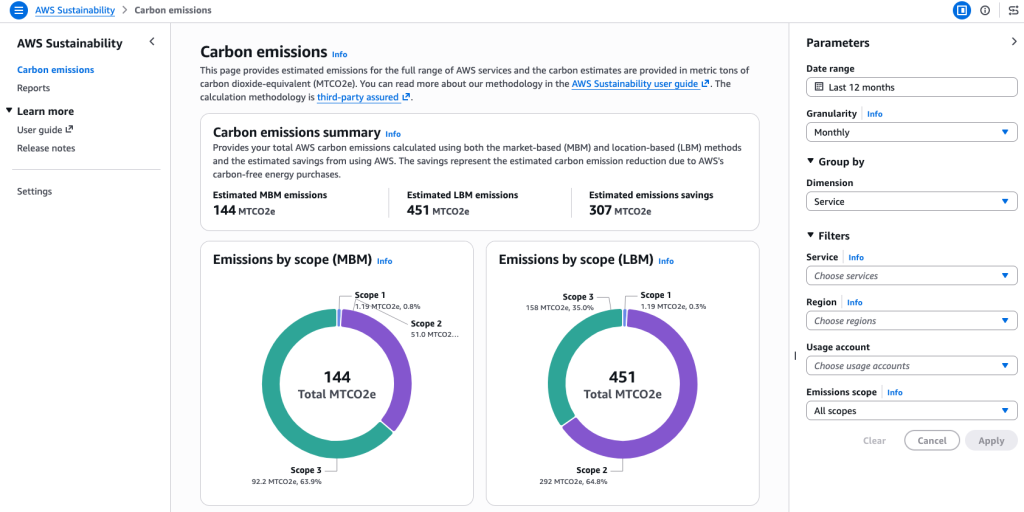
Navigate to the AWS Management Console and search for "Sustainability" in the services search bar. Click on the Sustainability Console result. Alternatively, you can use the direct URL: https://console.aws.amazon.com/sustainability/. Once inside, you will see an overview dashboard showing your carbon footprint summary by Scope (1, 2, and 3), broken down by AWS Region and service (e.g., Amazon EC2, Amazon S3, CloudFront). The underlying methodology matches the CCFT, so no surprises in data quality.
2. Configuring Fiscal Year Alignment
By default, the console uses the calendar year (January–December). To align with your organization's fiscal year, go to Settings (gear icon) and select Fiscal Year Configuration. Choose the starting month and day. Once saved, all dashboard views and exported reports will reflect your fiscal quarters and year. This eliminates a common friction point when finance and sustainability teams collaborate on annual reporting.
3. Generating Predefined and Custom CSV Reports
On the left menu, click Reports. You will see two options:
- Predefined Reports: Click Monthly Carbon Report or Annual Carbon Report to download a CSV containing market-based method (MBM) and location-based method (LBM) data. These are ready-to-use for standard compliance.
- Custom Reports: Click Create Custom Report. A form appears where you can select fields such as Service, Region, Scope, MBM/LBM, and time granularity (monthly, quarterly, yearly). You can also apply filters—for example, only show data from US East regions during Q2 of FY2024. After configuring, click Download CSV. The file is generated instantly.
4. Using the Sustainability API Programmatically
For automated workflows, leverage the GetCarbonFootprint API (available via AWS SDK or direct HTTP request). The following example uses the AWS CLI to retrieve emissions data for a specific month:
aws sustainability get-carbon-footprint \
    --start-time "2024-01-01T00:00:00Z" \
    --end-time "2024-01-31T23:59:59Z" \
    --group-by "SERVICE" "REGION"
This returns a JSON array with total emissions grouped by service and region. You can also specify the calculation method (MBM or LBM) and filter by scope. For Python SDK users, the equivalent code is:
import boto3

client = boto3.client('sustainability')
response = client.get_carbon_footprint(
    startTime='2024-01-01T00:00:00Z',
    endTime='2024-01-31T23:59:59Z',
    groupBy=['SERVICE', 'REGION']
)
print(response['CarbonFootprint'])
Integrate the response into your own dashboards (e.g., QuickSight, Tableau) or compliance systems.
5. Integrating Data into Reporting Pipelines
Because the API returns structured data, you can schedule regular pulls using AWS Lambda or CloudWatch Events. For example, create a Lambda function that runs on the first day of each month, invokes the GetCarbonFootprint API with the previous month's date range, and stores the output in S3. Then use Amazon Athena to query and aggregate historical data. This approach ensures your sustainability metrics are always up‑to‑date without manual intervention.
Common Mistakes
Mistake 1: Forgetting to Assign Correct IAM Permissions
Many users assume they need billing‑level permissions. In reality, the Sustainability Console uses a separate permission model. Attaching AWSustainabilityConsolasReadOnlyAccess is sufficient for viewing dashboards and downloading reports. For API access, ensure your IAM policy includes sustainability:GetCarbonFootprint. A typical mistake is giving full billing access, which is unnecessary and violates least‑privilege best practices.
Mistake 2: Assuming Calendar Year Default Works for All
Organizations with non‑standard fiscal years often forget to update the setting. Reports will then show incorrect time boundaries. Always verify your fiscal year configuration under Settings before generating annual summaries.
Mistake 3: Overlooking Rate Limits When Using the API
The GetCarbonFootprint API has a default throttle of 10 requests per second (adjustable via Service Quotas). If you are pulling data for many months or accounts concurrently, you may hit this limit. Implement exponential backoff in your client code or batch requests to avoid errors.
Summary
The AWS Sustainability Console makes it easy to access, configure, and export carbon emissions data across all three scopes. By decoupling sustainability permissions from billing, enabling fiscal year alignment, and offering both CSV reports and a programmable API, it empowers teams to integrate environmental metrics into existing workflows without friction. Start by granting the correct IAM policies, configure your fiscal year, then explore the Reports page or call the API to automate your reporting pipeline.