10 Reasons Why Belkin’s Pixel Watch Charging Dock Is Both Brilliant and Frustrating
If you own a Pixel Watch, you know the struggle: finding a reliable, multi-device charging station that handles your phone, earbuds, and watch in one place is nearly impossible. Enter Belkin’s 3-in-1 charging dock, which promises to solve that problem. But as with many Google accessories, there’s a catch. Google’s constant tinkering with the Pixel Watch design means this otherwise excellent dock might not age well. Here are the ten key things you need to know about this love-hate relationship.
1. The Pixel Watch Charging Void
Four generations into the Pixel Watch lineup, Google still hasn’t delivered a dedicated multi-device charging station. While other smartwatches enjoy a plethora of docks, Pixel Watch owners are left hunting for third-party solutions. This gap is frustrating, especially when you consider the convenience of a single pad that tops up your phone, earbuds, and wrist companion nightly. Belkin’s dock aims to fill that void, but it’s a uphill battle against Google’s shifting standards.
2. Belkin’s Best Effort Yet
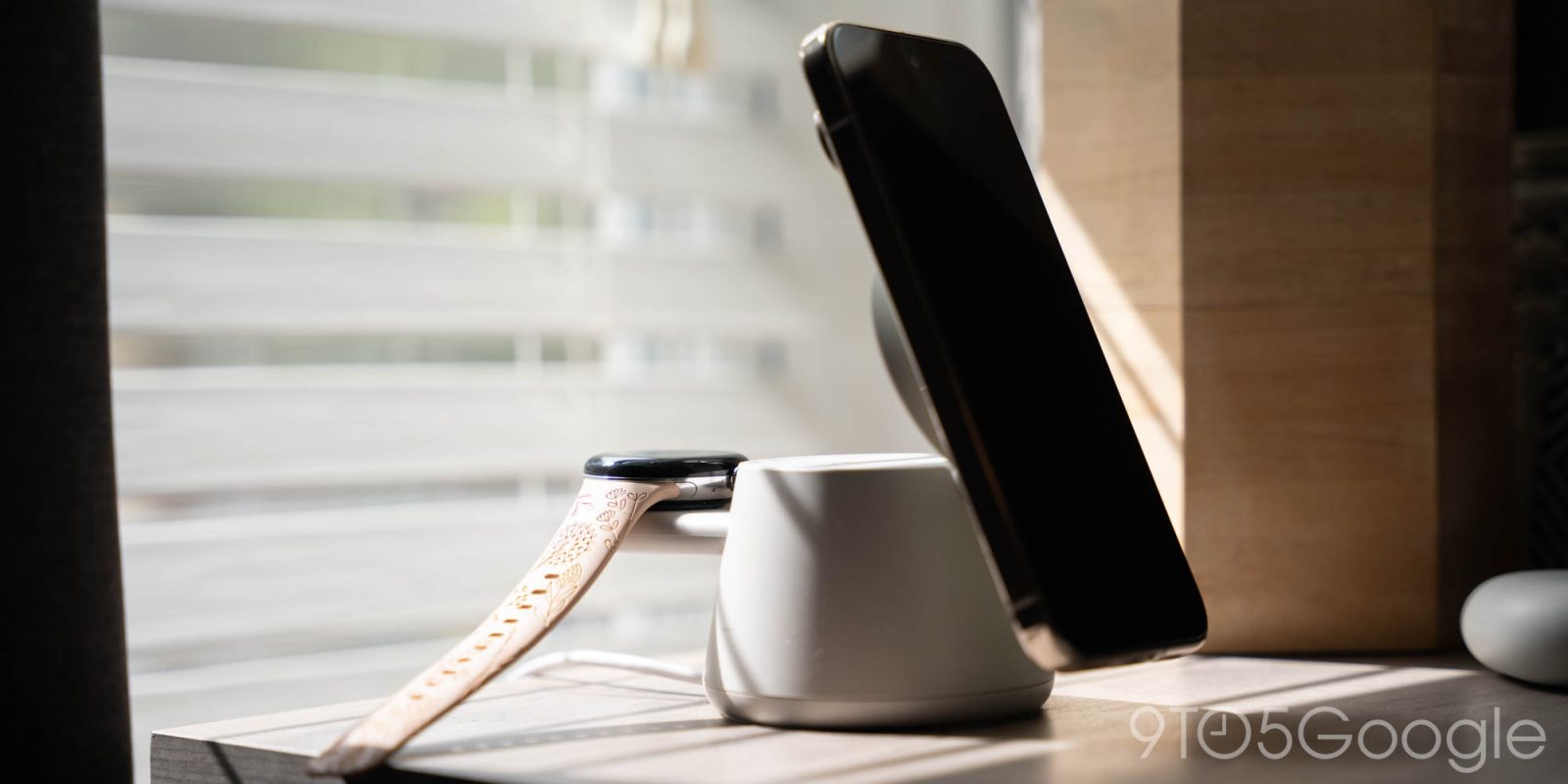
Belkin has crafted what is arguably the most polished Pixel Watch-compatible charging dock on the market. The design is sleek, with a dedicated watch cradle, a wireless charging pad for your phone, and a spot for earbuds. It’s compact enough for a nightstand and sturdy enough to prevent accidental knocks. The materials feel premium, and the integration of MagSafe-compatible alignment for iPhones is a nice touch—though Android users can still use it with any Qi-supporting device.
3. The Watch Cradle Issue
The dock includes a dedicated cradle for the Pixel Watch, which uses the watch’s own included charger. That might sound clever, but it’s also a weak point. The cradle is designed to hold the watch horizontally, which can be awkward if you prefer vertical alignment. More critically, the way the charger attaches feels flimsy, and the magnetic connection isn’t as strong as you’d hope. A slight bump can dislodge the watch, leaving it uncharged come morning.
4. Google’s Design Instability
Here’s the real kicker: Google can’t seem to settle on a charging standard. With each Pixel Watch generation, the charging puck changes slightly—different pin layouts, different alignment requirements. That means a dock designed for the Pixel Watch 2 might not fit the Pixel Watch 3, let alone future versions. Belkin’s dock is built for the current generation, but if Google changes again, it becomes a paperweight. This lack of backwards compatibility is a massive drawback for long-term investment.
5. Phone Charging Performance
The phone charging pad supports up to 15W for compatible devices, but actual speeds vary. For Pixel phones, you’ll get around 10W or less, depending on the model. The pad is flat and works with cases under 5mm, but it doesn’t have active cooling, so charging may slow if the pad heats up. Still, it’s a solid performance for overnight charging—just don’t expect fast top-ups during the day.
6. Earbuds Compatibility
The earbuds spot is a simple Qi pad, meaning any wireless earbuds will work—Pixel Buds Pro, Buds A-Series, or even AirPods with a case. But there’s a catch: the placement is fixed, and if your buds case is larger than average (like some third-party models), it might not sit flush. Also, the earbuds charger doesn’t have a magnet alignment, so you’ll need to ensure the case is centered for reliable charging.
7. Design and Build Quality
Belkin’s dock is well-constructed. It features a weighted base to prevent tipping, a braided USB-C cable (which is detachable, a plus for portability), and a matte finish that resists smudges. The watch cradle is angled at 45 degrees, making it easy to see the time or notifications while charging. However, the phone pad is flat, so you can’t use the phone while it’s docked easily. It’s a trade-off between form and function.
8. Price vs. Value
At around $100, this dock isn’t cheap—especially when you consider that it relies on the Pixel Watch’s own charger. For that price, you could buy two separate chargers. But the convenience of a single, organized solution can justify the cost for many. The problem is that if Google releases a new watch with a different charging design in a year, you’ll need to buy a new dock or adapter. That’s a steep recurring cost.
9. Competing Options
There are few alternatives. Some generic multi-device chargers include a watch module, but they often use a proprietary puck that doesn’t support Pixel Watch’s fast charging. Belkin’s is the only one that uses the official Google charger—meaning you get the fastest possible speeds. However, brands like Anker and Spigen have announced upcoming models, but availability is spotty. For now, Belkin stands alone in quality.
10. The Takeaway: Love the Dock, Hate the Uncertainty
Belkin’s 3-in-1 charging dock is a well-made product that delivers on its promise—when it works. The frustration lies entirely with Google’s inability to commit to a charging standard. If you’re a Pixel Watch owner who plans to upgrade within the same generation, this dock is a solid buy. If you’re hoping to use it for multiple years, you’re gambling on Google’s stability. In a perfect world, Belkin would make an adjustable cradle, but that’s not this dock.
In conclusion, Belkin’s Pixel Watch charging dock is a beacon of hope in a sea of lost accessories. It’s beautifully designed, functional, and fills a real need. Yet, Google’s design whims threaten to make it obsolete too soon. If you can accept that risk, you’ll love it. Otherwise, wait for a more future-proofed solution—or hope Google finally sticks with a charger.